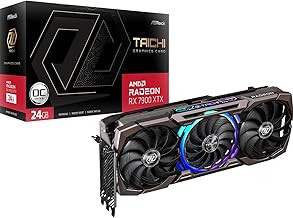
If you've recently built or upgraded to a high-performance system featuring a powerhouse like the AMD Radeon RX 7900 XTX, you've invested in top-tier 4K gaming and content creation. However, that massive, triple-fan cooler comes with a significant weight penalty. Over time, you might notice a troubling sight: your premium graphics card beginning to sag or bend at the far end of the PCIe slot. This isn't just an aesthetic issue; it's a genuine threat to your hardware's longevity and performance. In this comprehensive guide, we'll delve into the causes of GPU sag, the real-world risks it poses, and why a dedicated GPU brace or support bracket is no longer an optional accessory but a critical component for any serious PC builder.
Why Do Heavy GPUs Like the 7900 XTX Sag?
The physics behind GPU sag is straightforward. Modern high-end graphics cards, such as the 7900 XTX, are engineering marvels packed with dense circuitry, a large GPU die, and an extensive cooling solution. This combination often results in a card weighing well over 1.5 kilograms (over 3 pounds). The card is secured to your motherboard at only two points: the PCIe slot itself and a single screw at the rear I/O bracket. This creates a long cantilevered beam, with the heaviest part—the cooler and heatsink—extending far from the support point. Gravity does the rest, applying constant downward force that can strain the PCIe slot, the solder joints on the motherboard, and even the card's own PCB over months and years.
The Hidden Dangers of Ignoring GPU Sag
Dismissing GPU sag as merely "cosmetic" is a costly mistake. The persistent stress can lead to several critical failures. First and foremost is damage to the PCIe slot on your expensive motherboard. The slot's plastic retention clip can crack, and the delicate solder connections between the slot and the motherboard can fracture, leading to intermittent connection loss or complete failure. Secondly, the graphics card's own Printed Circuit Board (PCB) can warp. This warping can cause microfractures in the solder balls connecting the GPU, VRAM, and VRMs to the board—a phenomenon known as "solder joint fatigue." This often manifests as mysterious artifacts, crashes, or the card failing to post, and it's notoriously difficult to diagnose and repair. Finally, sag can misalign cooling solutions, potentially creating poor contact between the die and the heatsink, leading to higher thermals and thermal throttling, which directly impacts your 7900 XTX's performance.
Introducing the Ultimate Solution: The Graphics Card GPU Brace Support
This is where a dedicated support system becomes essential. A product like the Graphics Card GPU Brace Support is engineered specifically to solve this problem. Unlike makeshift solutions like LEGO bricks or figurines, a purpose-built anti-sag bracket provides reliable, adjustable, and secure support. The model designed for large cards (L, 74-120mm) is perfect for behemoths like the 7900 XTX. It installs vertically from the bottom of your case, directly under the sagging corner of your GPU, transferring the weight safely to the case chassis and completely relieving stress from the PCIe slot and motherboard.
Key Features of an Effective GPU Stand
When choosing a support, look for these features exemplified by quality brackets: Adjustable Height: The 74-120mm range ensures compatibility with a wide variety of cases and card sizes, allowing for a perfect, snug fit without applying upward pressure. Sturdy Construction: Made from robust aluminum or steel, it won't compress or wobble over time. Secure Base & Top: A wide, non-slip base prevents tipping, while a padded or rubberized top protects your GPU's finish. Discreet Design: A sleek, minimalist look (often in black or silver) maintains your build's aesthetics without drawing undue attention. Installing such a graphics card support is one of the simplest yet most impactful upgrades for system stability.
Step-by-Step: How to Install Your GPU Sag Holder Bracket
Installation is a quick and tool-free process that any builder can manage. First, power down your PC and open the side panel. Identify the optimal placement point, usually directly under the far-right corner of your graphics card, aligned with a case fan mount or a vented area on the bottom panel. Extend the GPU stand to a height slightly taller than the gap. Carefully position it, then gently lower your graphics card until its corner rests firmly on the bracket's padded top. Slowly compress the bracket's adjustment mechanism until it is snug and supporting the full weight. The goal is to have the GPU perfectly level, with the bracket holding the weight, not the PCIe slot. Re-secure the GPU's rear bracket screw if needed, close your case, and power on. You'll have immediate peace of mind seeing your card perfectly level.
Why Every 7900 XTX Owner Needs This PC Building Accessory
Considering the premium price of an AMD Radeon RX 7900 XTX, protecting that investment is paramount. A PC building accessory like a support bracket is incredibly inexpensive insurance. It proactively prevents hundreds of dollars in potential damage to your GPU and motherboard. Beyond protection, it also contributes to a cleaner, more professional-looking build. A sagging card can make even the most meticulously crafted PC look haphazard. A discreet bracket ensures your showcase component is displayed as intended—proudly and level. For builders who frequently transport their systems (for LAN parties or events), this support is doubly important, preventing jolts and vibrations from exacerbating sag-related stress during movement.
Common Myths About GPU Support Brackets Debunked
Myth 1: "My case has a reinforced PCIe slot; I don't need a bracket." While reinforcement helps, it doesn't eliminate the bending force on the card's own PCB or the solder joints. A bracket addresses the root cause. Myth 2: "I can just use a pencil or some fishing line." Improvised supports are often unstable, can slip, may scratch components, and don't provide consistent, distributed support. They are a temporary hack, not a solution. Myth 3: "Sag only happens in cheap cases." GPU sag is a function of card weight and motherboard attachment physics. It occurs in all cases, from budget to premium, because the motherboard mounting points are standardized. A dedicated video card sag holder is the only engineered solution.
Conclusion: Secure Your Performance, Secure Your Investment
Your 7900 XTX is built for unparalleled performance, but its sheer capability comes with physical demands that the standard PC case layout wasn't designed to handle indefinitely. GPU sag is a silent, slow-motion threat that compromises the integrity of your entire system. By integrating a simple, effective, and affordable GPU brace support into your build, you are not just fixing a tilt; you are ensuring the long-term health and reliability of your high-end computer hardware. It's the definitive, professional step to complete your build and safeguard the heart of your gaming rig. Don't wait for a failure—proactively support your GPU today.