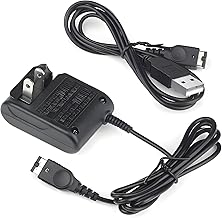
For retro gaming enthusiasts, the Gameboy Advance SP remains a beloved icon. Its clamshell design and brilliant backlit screen revolutionized portable play. But what good is a classic console without power? Finding the right charger is crucial for keeping your gaming sessions alive. Whether you've dug your old SP out of the attic or are diving into the retro scene, understanding your charging options—from the original AC adapter to modern USB solutions—is the first step to uninterrupted adventure.
This comprehensive guide will walk you through everything you need to know about Gameboy Advance SP chargers. We'll cover the different types available, how to choose the best one for your needs, and essential tips for maintaining your console's battery life. Let's ensure your pocket-sized portal to the past never runs out of juice.
Understanding Your Gameboy Advance SP Power Needs
The Gameboy Advance SP uses a proprietary charging port, distinct from its predecessor. It requires a specific voltage and polarity to charge safely and efficiently. Using an incorrect or poorly made charger can, at best, result in slow charging and, at worst, potentially damage your console's internal battery or circuitry. The original Nintendo AC adapter was the standard, but today, a variety of third-party and modern solutions exist, including versatile USB cables.
It's also important to note the compatibility with other systems. A charger designed for the Nintendo DS console often works with the GBA SP, as they share a similar power port specification. This cross-compatibility is a huge bonus for collectors who own multiple Nintendo handhelds from that era.
Types of Gameboy Advance SP Chargers
The Official AC Adapter
The original Nintendo AC Adapter plugs directly into a wall outlet. It's a reliable, dedicated power source known for its stable output. For purists and those who want guaranteed compatibility, seeking out an original or high-quality licensed replica is the way to go. It provides a straightforward, no-fuss charging experience, perfect for a dedicated gaming station at home.
USB Power Cables: The Modern Solution
This is where convenience truly shines. A USB power cable for GBA SP allows you to charge your console from virtually any USB port. This means you can use your laptop, a power bank, a car charger, or a modern wall adapter (like the one for your phone). This flexibility makes it an essential travel power cord. No more hunting for a specific wall outlet while on the go; just plug it into your portable battery pack and keep playing.
Universal and Third-Party Chargers
Many third-party manufacturers produce chargers that work with a range of devices. A universal USB adapter with interchangeable tips might include one for the GBA SP. These can be cost-effective and versatile, especially if you have other old electronics to power. However, always ensure they are from a reputable source to avoid the risks associated with cheap, uncertified electronics.
Choosing the Right Charger for Your Lifestyle
Your ideal charger depends on how and where you play. Are you a homebody, a frequent traveler, or a bit of both?
- For the Home Gamer: A traditional AC adapter is perfect. Leave it plugged in by your favorite chair for easy access.
- For the Traveler: A USB cable is indispensable. Pair it with a high-capacity power bank for long journeys, making it the ultimate portable game charger solution.
- For the Collector/Multi-Console Owner: Consider a multi-tip universal adapter or a charger explicitly marketed for both the GBA SP and Nintendo DS to streamline your Gameboy accessory collection.
Essential Tips for Charging and Battery Care
Proper care extends the life of both your charger and your Gameboy Advance SP's rechargeable battery. Avoid leaving the console plugged in continuously for days on end, as this can stress the battery. Try to charge it before it fully dies and unplug it once the charge light indicates it's full. If you plan to store the console for a long period, charge the battery to about 50% first. Store your retro gaming charger neatly, avoiding sharp bends in the cable to prevent internal wire damage.
Troubleshooting Common Charging Issues
If your GBA SP isn't charging, don't panic. Start with the simplest solutions: ensure the wall outlet is working, try a different USB port, or check the cable connection at the console's port for dust or debris (carefully clean with a dry toothbrush if needed). If you're using a USB cable, try a different power source, like a computer instead of a wall adapter, to rule out source issues. The problem could be a worn-out battery, which, after nearly two decades, is a common issue. Replacement batteries are widely available and can breathe new life into an unresponsive SP.
Conclusion: Power Up Your Retro Passion
The Gameboy Advance SP is a timeless piece of gaming history, and keeping it powered shouldn't be a chore. Whether you opt for the classic feel of an AC adapter or embrace the modern versatility of a USB cable, the right charger ensures your adventures in the Pokémon world, the depths of Zelda, or the tracks of Mario Kart never have to pause. By choosing a quality solution and following simple battery care tips, you can preserve both your console and your nostalgia for years to come. Now, go plug in and play!