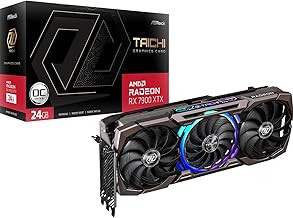
If you've recently invested in a high-performance graphics card like the powerful AMD Radeon RX 7900XTX, you've unlocked incredible 4K gaming and content creation potential. However, that impressive power comes with significant physical heft. One of the most common, yet often overlooked, issues facing modern PC builders is graphics card sag. This phenomenon, where the weight of the GPU causes it to droop or bend at the PCIe slot, isn't just an aesthetic concern—it's a genuine threat to the longevity and stability of your expensive hardware. In this comprehensive guide, we'll explore the science behind GPU sag, its specific impact on heavy cards like the 7900XTX, and why a dedicated support solution is no longer optional but essential.
Understanding GPU Sag: The Physics of a Heavy Graphics Card
Modern graphics cards, especially flagship models like the 7900 XTX, are engineering marvels packed with dense circuitry, massive cooling solutions, and robust power delivery systems. This results in a component that can weigh well over two kilograms. When mounted horizontally in a standard ATX case, this weight creates a significant cantilever force on the PCIe slot. The slot itself and the few screws securing the card's bracket to the case chassis are the only points of support, leading to inevitable flex over time. This stress isn't uniform; it concentrates on the delicate solder joints connecting the GPU to the printed circuit board (PCB) and on the PCIe connector itself. While motherboards are designed with some tolerance, the sustained stress from a heavy card can lead to permanent damage.
The Real Risks: Why Ignoring Sag is a Costly Mistake
Dismissing GPU sag as a mere cosmetic flaw is one of the most expensive mistakes a PC enthusiast can make. The risks are multifaceted and cumulative. Firstly, the constant mechanical stress can crack solder joints on the GPU, memory chips, or voltage regulation modules (VRMs). These micro-fractures may not cause immediate failure but can lead to intermittent crashes, graphical artifacts, and eventual total component death. Secondly, the strain on the PCIe slot can damage the motherboard's traces or the slot's plastic housing, compromising the electrical connection and potentially causing data corruption or complete signal loss. For a premium card like the 7900XTX, which represents a major financial investment, these risks are unacceptable. Proactive protection is far cheaper than a motherboard or GPU replacement.
Introducing the Ultimate Defense: The Adjustable GPU Support Bracket
This is where a purpose-built GPU support bracket becomes a critical component of any high-end build. Unlike makeshift solutions like LEGO bricks or action figures, a dedicated bracket is engineered to address the problem systematically. Take, for example, a premium GPU Support Bracket with height adjustment. This isn't just a prop; it's a structural support system. Its core function is to transfer the weight of the graphics card from the vulnerable PCIe slot directly to the solid base of your PC case. By providing a stable pillar of support directly under the card's far corner—the point of greatest sag—it neutralizes the cantilever force entirely.
Key Features of an Effective Anti-Sag Solution
Not all supports are created equal. When selecting a bracket for a heavyweight champion like the 7900 XTX, look for these essential features found in quality models:
- Height Adjustability: PC cases and graphics cards vary tremendously in size. A bracket with a screw-based or telescoping adjustment mechanism allows for a perfect, custom fit, ensuring the support makes full, even contact with the card's underside without applying upward pressure.
- Secure Mounting: The best brackets use a combination of a strong magnetic base and a non-slip rubber pad. The magnet anchors firmly to the steel case floor, while the rubber pad prevents scratching and provides grip against the GPU's backplate or shroud.
- Universal Compatibility: A well-designed anti sag holder should work with any modern graphics card, from dual-slot to massive triple-slot designs, and fit within a wide range of case layouts without interfering with fans, cables, or other components.
- Minimalist Design: It should perform its function without drawing undue attention. A sleek, black anodized finish allows it to blend seamlessly into the build, maintaining your system's clean aesthetic.
Step-by-Step: Installing Your GPU Support Bracket
Installing a support bracket is a simple yet impactful upgrade. Here’s how to do it correctly for your 7900XTX:
- Prepare Your System: Power down your PC, unplug it, and open the side panel. For safety, you may want to remove the graphics card to have clear access to the case floor, though installation with the card mounted is often possible.
- Position the Bracket: Place the adjustable GPU stand on the case floor directly beneath the free corner of your graphics card. Use the magnetic base to hold it in place temporarily.
- Adjust the Height: This is the most crucial step. Carefully extend the pillar of the bracket until it gently touches the underside of the GPU. You want contact that eliminates sag, but you should not be lifting the card. The goal is to support its natural, level position.
- Finalize and Secure: Once the height is perfectly set, ensure the rubber pad is clean and making full contact. The magnet will hold it firmly. Re-check that no cables or fan blades are obstructed.
- Power On and Verify: Close your case, power on the system, and visually confirm the graphics card is now perfectly level. Enjoy the peace of mind that comes with a properly supported system.
Beyond the 7900XTX: A Must-Have for Modern High-End GPUs
While we've focused on the 7900XTX, the need for a video card brace extends to nearly all high-end GPUs from both AMD and NVIDIA. The trend towards larger coolers and more complex PCBs means cards like the RTX 4090, RX 7900 XT, and even high-end RTX 4080 models are all susceptible to sag. Viewing a GPU bracket as a standard PC case accessory—as essential as case fans or cable ties—is a shift in mindset for savvy builders. It's a small investment that safeguards a much larger one.
Conclusion: Protect Your Performance, Preserve Your Investment
Building a high-performance PC is an exercise in balancing power, thermals, and aesthetics. However, structural integrity is a foundation that cannot be ignored. The formidable performance of the AMD Radeon RX 7900XTX demands an equally formidable approach to its physical support. An adjustable, magnetic GPU support bracket is the simplest, most effective, and most elegant solution to the universal problem of graphics card sag. It's not just a piece of metal; it's an insurance policy for your GPU, your motherboard, and your peace of mind. Don't let gravity undermine your gaming experience—support your card properly and ensure your system remains stable and reliable for years to come.